Introducing CyberArk Secure Browser: Your gateway to securing all identities with a single click.
Making Waves: CyberArk Named a Leader in The Forrester Wave for Workforce Identity Platforms 2024
Secure every identity — human and machine — with the right level of privilege controls.


Secure identities.
Shut out attackers.
Seamlessly secure identities throughout the cycle of accessing any resource across any infrastructure, including hybrid, SaaS and multi-cloud. The CyberArk identity security platform is the first line of defense against malicious actors and unauthorized access to protect what matters most.

Seamless & secure access for all identities
By combining secure SSO, Adaptive MFA, Lifecycle Management, Directory Services and User Behavior Analytics, we help you streamline operations and give users simple and secure access to resources—on-premises, cloud, hybrid—from any location, using any device.

Intelligent privilege controls
Apply world-class intelligent privilege controls across the IT estate, as well as differentiated controls to secure the unique needs of workforce users, third-party vendors, endpoints and machine identities as they access sensitive data.

Flexible identity automation & orchestration
Streamline HR processes, ensure users have the right access to the right resources, enable compliance with industry or government regulations, and improve efficiencies across the board with orchestration and lifecycle management, permissions and entitlements, and directory and federation services.
Identity security defined
Centered on intelligent privilege controls, identity security seamlessly secures access for all identities and flexibly automates the identity lifecycle with continuous threat detection and prevention — all with a unified approach.
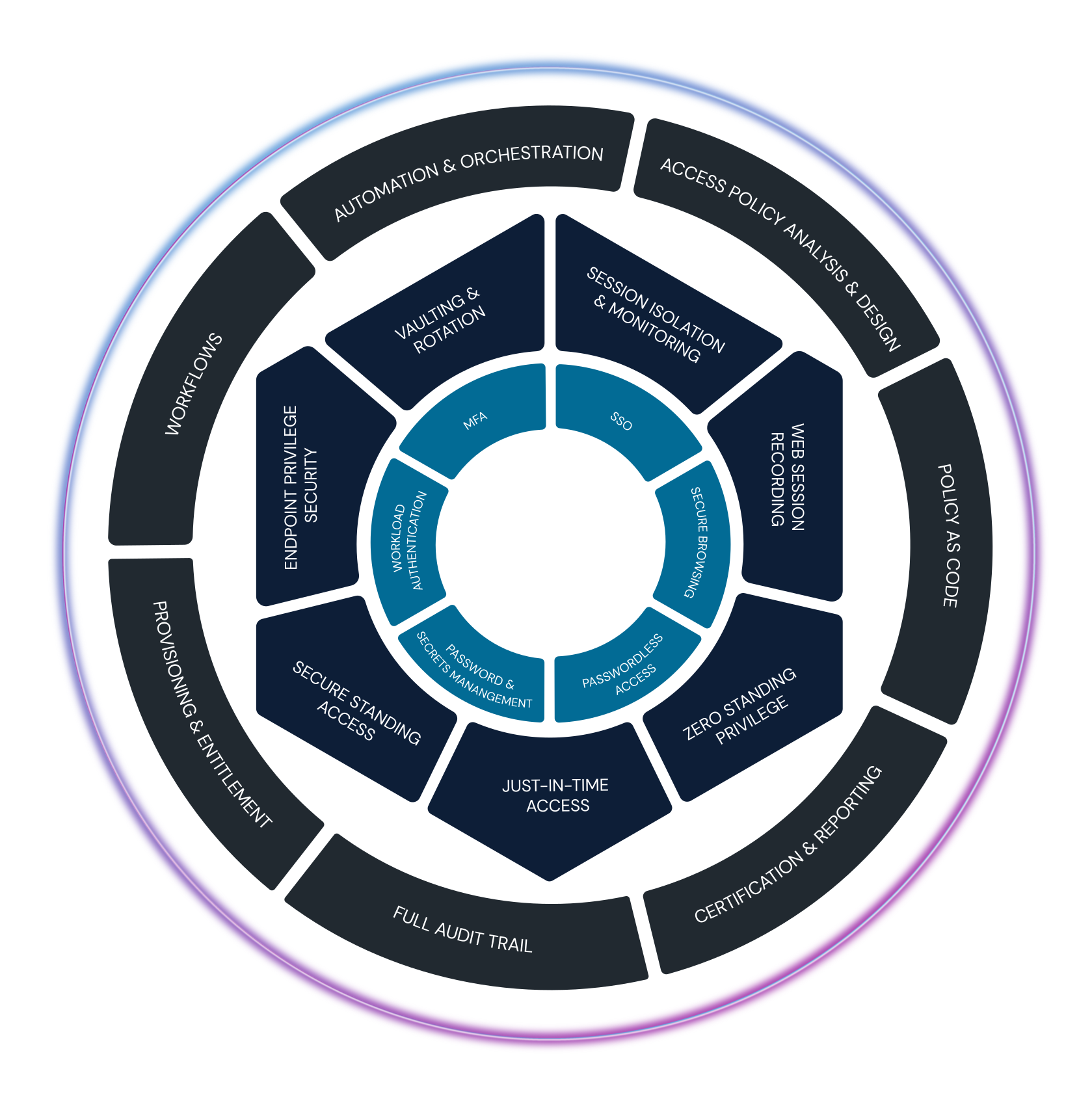
Apply intelligent privilege controls across the entire identity lifecycle
Expand intelligent privilege controls that were designed for the most privileged user, such as an admin, to a broader range of human and machine identities, whenever standing or just-in-time access is required.


Threat research and innovation: CyberArk Labs
A team of researchers dedicated to examining emerging attack techniques so that organizations everywhere can strengthen their security posture.




“If we can control identity, we can stop most modern attacks. That is what I call true Zero Trust and that is why we use CyberArk. This is what helps me sleep at night.”
Brian Miller, CISO, HealthFirst